Agents
Agents check the funnel on your schedule
Start from a template such as “Check my paid funnels each morning” or “Experiment reviewer”, and set when it runs: every day, every week, every month or every few hours.
SuperAgent
SuperAgent checks your pages, quizzes and tests on a schedule, tells you what to fix and why, and builds the change with you. Its brain is yours to shape.

Launching a funnel takes a day. Owning it takes someone who checks it every morning, notices what broke and what could be better, and remembers what you decided last time.
Owning the funnel
Agents
Start from a template such as “Check my paid funnels each morning” or “Experiment reviewer”, and set when it runs: every day, every week, every month or every few hours.
Opportunities
Each finding is an opportunity: why it was flagged, its estimated impact, and the proposed change next to what is there now. Review it with SuperAgent, or mark it resolved.
Alerts
Page errors that spike, a tracking pixel that stops firing, a page that got slow, an ad account that needs reconnecting. Each alert carries a priority, and SuperAgent can resolve it with you.
Approvals
On Default Approvals it pauses before anything risky. When it runs in the background with no one to ask, the action waits for you as an opportunity.
The Brain
Google Ads, Meta Ads, TikTok Ads, Microsoft Ads, HubSpot, Slack, Gmail, Google Drive and more. Anything else joins as a custom MCP server, and each tool is set to Allow, Ask first or Deny.
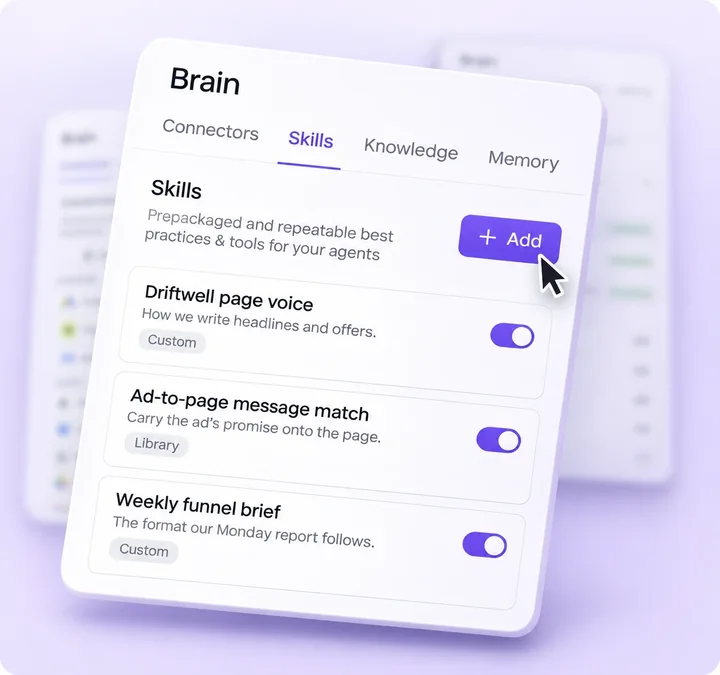
SuperAgent comes with SuperFunnel’s own skills for pages, quizzes and variants. Add yours from a file, GitHub or the library. Where the two disagree, it follows yours.
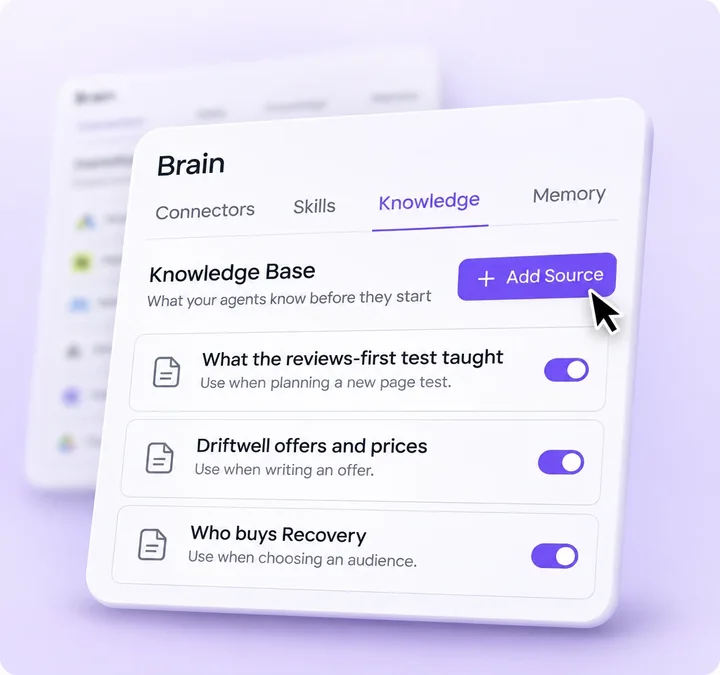
Save what a test taught, your offers, your audience research. Write it in or upload a PDF or a Word file, and SuperAgent searches it on every request.
Tell it a preference or a business fact once. It is kept as a memory and brought into later sessions, and you can edit it or switch it off.
Where you work
Ask for a Black Friday funnel in Slack, by direct message or channel mention. SuperAgent also works in the dashboard, and inside Claude and ChatGPT through MCP with the permissions you choose.
 Slack
 SuperFunnel
 Claude
 ChatGPT12 members
@SuperAgent create a new funnel for our Black Friday campaign
Done. Here’s what’s ready:
Conversion on the Black Friday page dropped 28% since a rival launched 30% off yesterday.
Approved. How long until we know?
Test is live on 50% of the traffic. At this volume, about 3 days to a clear winner. I’ll post it here.
Scheduled agents check your pages, quizzes, experiments and ad accounts. What they find arrives as opportunities, each with its reasoning and a proposed change, and alerts fire when something breaks. You review, and SuperAgent builds what you accept.
The part of the workspace that holds what SuperAgent works with, in four tabs: Connectors, Skills, Knowledge and Memory. Admins manage connectors. Skills, knowledge sources and memories can each be switched off or archived.
Slack, Google Ads, Meta Ads, TikTok Ads, Microsoft Ads, ChatGPT Ads, HubSpot, Attio, Gmail, Google Drive, Docs, Sheets and Slides, Calendly, Semrush, Similarweb and Higgsfield, with more in the catalog. Any other remote MCP server is added with its HTTPS endpoint, and every tool of a connector is set to Allow, Ask first or Deny.
Yes. Upload a Markdown or text file with a title and a procedure, import a skill from a public GitHub repository, or add one from the library. Your skills are applied alongside SuperFunnel’s, and where they conflict SuperAgent follows yours.
It works from what is saved in the Brain. Ask it to save what a test taught as Knowledge, or write it in yourself, and that source is searched on every later request. Preferences and business facts you give it are kept as Memory and brought into later sessions.
Not on the default level. Default Approvals pauses before risky actions such as publishing. Autopilot (Preview) runs safe actions automatically and uses an AI judge for medium-risk ones. Bypass Approvals performs actions without asking. You choose the level for each chat and each scheduled agent.
Start with templates such as “Check my paid funnels each morning”, “Experiment reviewer”, “Review new lead quality”, “Traffic routing auditor” and “Funnel launch checker”. Set the schedule: daily, weekly, monthly or an interval. They report findings and prepare changes for review.
Page Error Spike, Tracking Pixel Failure, Poor Page Speed, Page Speed Regression, Integration Health, Ad Account Reconnection and Captcha Misconfigured. SuperAgent can raise alerts of its own too. Each one has a priority from Low to Critical.
Yes. Edit directly in the builder, or select an element and tell SuperAgent what to change. Agent edits are listed for review, and every published version can be restored.
See SuperFunnel with your brand, your goals and your next idea.
Book a demoFor teams spending $25K+ a month on paid ads